TCA 수준의 단방향 구조란
TCA나 ReactorKit에 익숙한 상태에서 React Native의 상태 관리 도구를 고르려면 먼저 어떤 구조를 기준으로 삼을지 정해야 합니다. 상태를 한 방향으로만 바꾼다는 조건만으로는 후보가 좁혀지지 않으므로 TCA가 갖춘 네 가지를 기준으로 삼았습니다.
- State를 바꾸는 규칙이 순수한 Reducer에 모여 있다
- 네트워크 호출 같은 부수 효과가 Reducer 밖의 Effect로 분리되어 있다
- 외부 의존성을 주입해서 테스트에서 교체할 수 있다
- 기능 단위로 나눈 Reducer를 합성할 수 있다
이 글은 위 기준을 Redux Toolkit과 createListenerMiddleware로 충족하는 방법을 TCA 코드와 나란히 비교합니다.
먼저 결과부터
| Swift | React Native 대응 | 구성 |
|---|---|---|
| TCA | Redux Toolkit + createListenerMiddleware |
createSlice가 Reducer를 맡고 리스너가 Effect를 맡음 |
| ReactorKit | redux-observable | RxJS Epic이 Action을 받아 Action을 반환 |
| 명시적인 상태 전이 | XState | Reducer 대신 상태 머신으로 전이를 정의 |
TCA와 가장 비슷하게 구성하려면 Redux Toolkit(이하 RTK)에 createListenerMiddleware를 붙이는 조합이 맞다고 판단했습니다. ReactorKit처럼 Observable로 Effect를 다루려면 redux-observable이 가깝지만 RxJS를 함께 익혀야 합니다.
Zustand와 Jotai도 널리 쓰입니다. 다만 Zustand는 스토어 안의 함수로 상태를 바꾸는 사용법이 기본이고 Jotai는 atom 단위로 상태를 나눕니다. atom은 atom(0)처럼 만드는 값 하나짜리 최소 상태 단위입니다. 둘 다 Action과 Reducer를 분리한 흐름이 기본 사용법이 아니므로 같은 구조를 만들려면 규칙을 직접 세워야 합니다.
서버 데이터의 캐싱과 동기화는 TanStack Query 같은 도구의 영역이라 이 글에서는 다루지 않습니다.
단방향 흐름
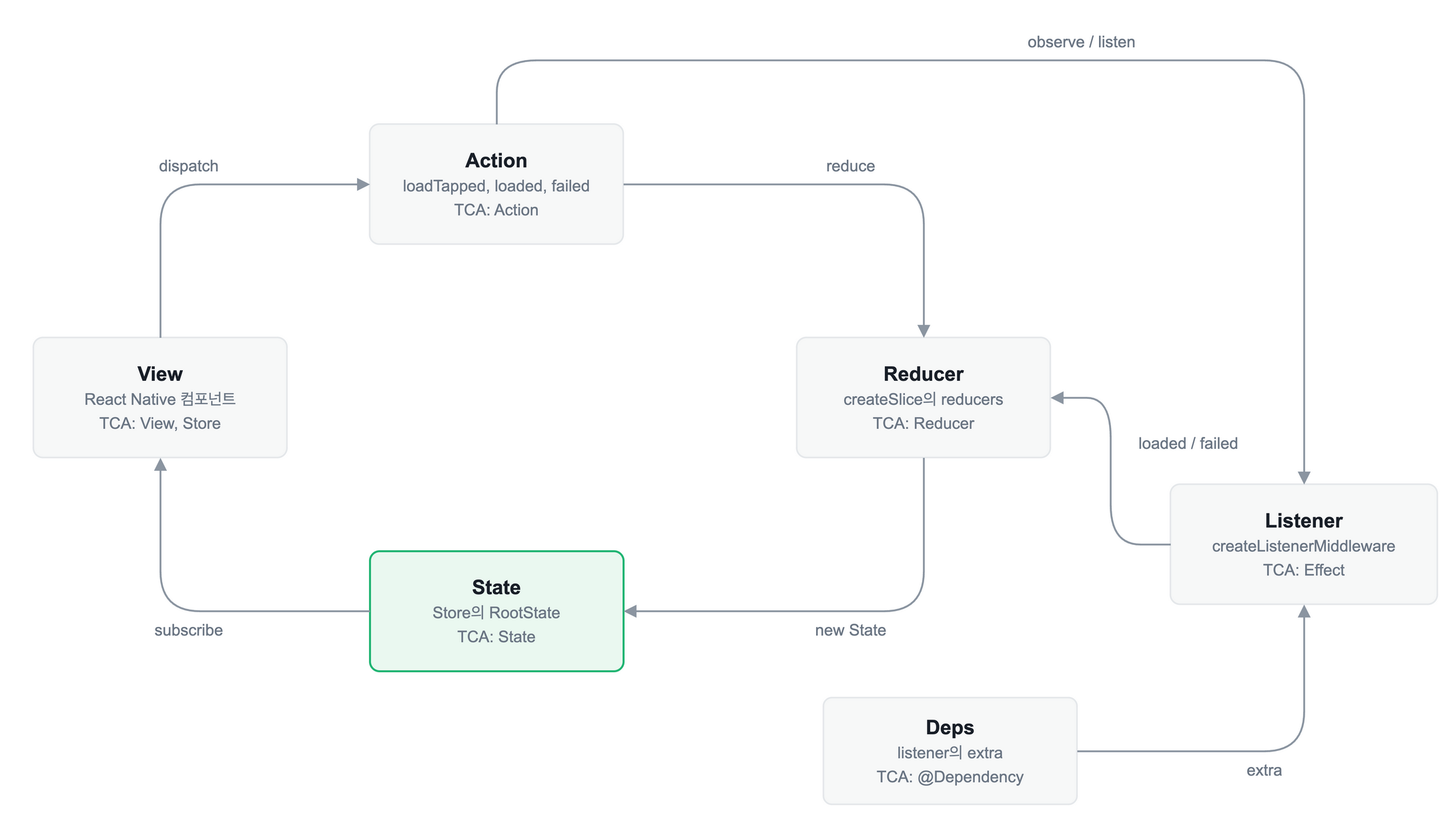
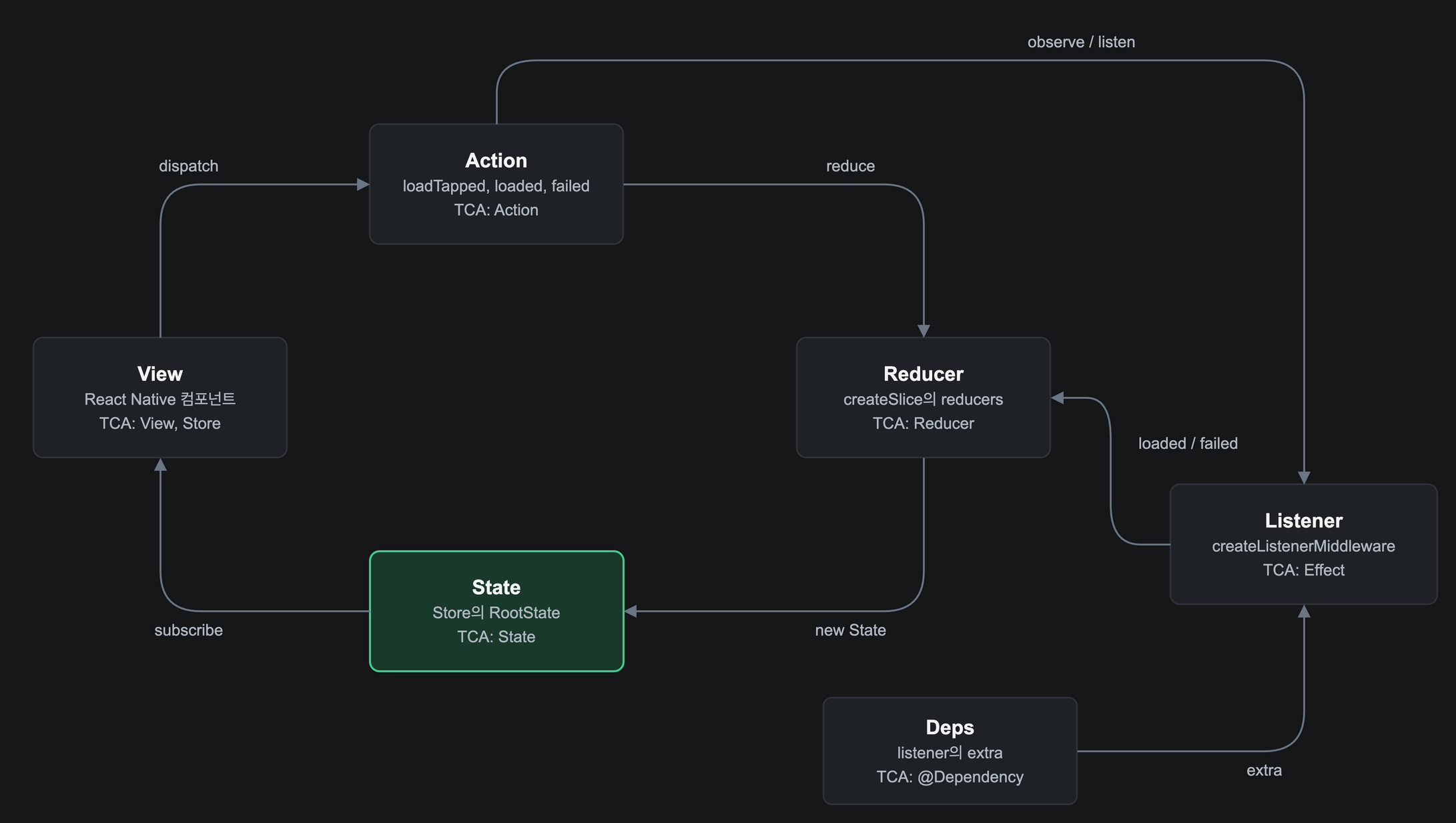
흐름은 다음 순서입니다.
- View가
dispatch로 Action을 보냅니다. - Reducer가 Action을 받아 새 State를 만듭니다.
- State가 바뀌면
useAppSelector로 구독한 View가 다시 그려집니다. - Listener는 Reducer가 Action을 처리한 뒤에 실행되어 부수 효과를 수행합니다. 결과는 State를 직접 바꾸지 않고 Action으로
dispatch합니다. - 외부 의존성은
extra로 Listener에 주입합니다.
State를 바꾸는 곳이 Reducer 하나뿐이라는 점이 TCA와 같습니다. Listener가 Reducer 다음에 실행된다는 점은 RTK 문서에서 확인했습니다.
createListenerMiddleware와 redux-saga
Effect를 맡을 도구로는 createListenerMiddleware와 redux-saga를 비교했습니다.
| 항목 | createListenerMiddleware |
redux-saga |
|---|---|---|
| 도입 | RTK에 포함 | 별도 패키지 설치 |
| 작성 방식 | async/await |
generator와 effect(call, put, take, fork) |
| 취소와 대기 | cancelActiveListeners, pause, delay, condition, take, fork |
race, 취소, 장기 실행 작업, 채널을 폭넓게 지원 |
| 테스트 | 목 의존성으로 스토어를 만들어 결과 State 확인 | effect를 단계별로 검증하거나 목 의존성으로 실행 |
createListenerMiddleware를 선택했습니다. async/await로 Effect를 작성할 수 있고 RTK에 포함되어 의존성이 늘지 않기 때문입니다. RTK 문서는 리스너 미들웨어가 saga나 observable을 완전히 대체하려는 도구는 아니라고 설명합니다. 이미 saga로 작성된 코드베이스이거나 웹소켓 구독처럼 장기 실행 작업과 취소 경합을 정교하게 다뤄야 한다면 saga가 맞습니다.
같은 기능을 TCA와 RTK로
프로필 불러오기를 두 방식으로 구성합니다. 버튼을 누르면 사용자 정보를 불러오고 성공하면 State에 저장하며 실패하면 오류 메시지를 저장합니다. 예제의 RTK 코드는 @reduxjs/toolkit 2.13.0과 strict 모드 TypeScript에서 타입 검사를 통과했고 성공, 실패, 연속 호출을 각각 실행해 동작을 확인했습니다. TCA 코드는 컴파일하지 않고 구조 비교용으로 작성했습니다.
State, Action, Reducer
TCA에서는 Reducer가 State를 바꾸면서 Effect를 함께 반환합니다. userClient는 @Dependency로 주입받는 의존성입니다.
@Reducer
struct ProfileFeature {
	@ObservableState
	struct State: Equatable {
		var user: User?
		var isLoading = false
		var errorMessage: String?
	}

	enum Action {
		case loadTapped
		case loaded(User)
		case failed(String)
	}

	private enum CancelID {
		case load
	}

	@Dependency(\.userClient) var userClient

	var body: some ReducerOf<Self> {
		Reduce { state, action in
			switch action {
			case .loadTapped:
				state.isLoading = true
				state.errorMessage = nil
				return .run { send in
					do {
						let user = try await userClient.fetch()
						await send(.loaded(user))
					} catch {
						await send(.failed(error.localizedDescription))
					}
				}
				.cancellable(id: CancelID.load, cancelInFlight: true)
			case let .loaded(user):
				state.isLoading = false
				state.user = user
				return .none
			case let .failed(message):
				state.isLoading = false
				state.errorMessage = message
				return .none
			}
		}
	}
}
RTK에서는 createSlice가 Action과 Reducer를 함께 만듭니다. Reducer는 State만 바꾸고 Effect를 반환하지 않습니다.
// profileSlice.ts
import { createSlice, type PayloadAction } from '@reduxjs/toolkit'

export type User = { id: string; name: string }

type ProfileState = {
	user: User | null
	isLoading: boolean
	errorMessage: string | null
}

const initialState: ProfileState = { user: null, isLoading: false, errorMessage: null }

const profileSlice = createSlice({
	name: 'profile',
	initialState,
	reducers: {
		loadTapped(state) {
			state.isLoading = true
			state.errorMessage = null
		},
		loaded(state, action: PayloadAction<User>) {
			state.isLoading = false
			state.user = action.payload
		},
		failed(state, action: PayloadAction<string>) {
			state.isLoading = false
			state.errorMessage = action.payload
		},
	},
})

export const { loadTapped, loaded, failed } = profileSlice.actions
export default profileSlice.reducer
Effect와 의존성
TCA의 .run에 해당하는 코드가 RTK에서는 Reducer 밖의 리스너입니다. loadTapped Action을 관찰하다가 extra로 주입된 userClient를 호출하고 결과를 Action으로 dispatch합니다.
테스트에서 의존성을 바꿀 수 있도록 스토어를 함수로 만들었습니다. 이 함수가 TCA의 withDependencies와 비슷한 역할을 합니다.
// store.ts
import {
	combineReducers,
	configureStore,
	createListenerMiddleware,
	TaskAbortError,
	type Dispatch,
	type UnknownAction,
} from '@reduxjs/toolkit'
import profileReducer, { failed, loadTapped, loaded, type User } from './profileSlice'

export type Deps = { userClient: { fetch: () => Promise<User> } }

const rootReducer = combineReducers({ profile: profileReducer })

export type RootState = ReturnType<typeof rootReducer>
export type AppDispatch = Dispatch<UnknownAction>

export const makeStore = (deps: Deps) => {
	const listenerMiddleware = createListenerMiddleware({ extra: deps })
	const startAppListening = listenerMiddleware.startListening.withTypes<RootState, AppDispatch, Deps>()

	startAppListening({
		actionCreator: loadTapped,
		effect: async (_, { dispatch, extra, cancelActiveListeners, pause }) => {
			cancelActiveListeners()
			try {
				dispatch(loaded(await pause(extra.userClient.fetch())))
			} catch (error) {
				if (error instanceof TaskAbortError) return
				dispatch(failed(String(error)))
			}
		},
	})

	return configureStore({
		reducer: rootReducer,
		middleware: (getDefaultMiddleware) => getDefaultMiddleware().prepend(listenerMiddleware.middleware),
	})
}
이전 호출 취소는 pause까지 써야 한다
TCA의 .cancellable(id:cancelInFlight:)에 해당하는 RTK의 기능은 cancelActiveListeners()입니다. 다만 이것만 호출해서는 이전 호출의 결과가 막히지 않습니다. RTK 문서에 따르면 취소는 pause, delay, condition, take 같은 listenerApi 함수에서만 반영되고 일반 Promise를 await하는 구간은 중단되지 않습니다.
loadTapped를 두 번 연속 dispatch하고 첫 요청을 더 느리게 만들어 실행해 보았습니다. pause 없이 await extra.userClient.fetch()만 쓰면 첫 요청의 결과가 State에 반영되었습니다. pause로 감싸자 마지막 요청의 결과만 반영되었습니다.
pause로 취소된 Effect는 TaskAbortError를 던집니다. catch에서 이 오류를 구분하지 않으면 취소가 실패 Action으로 처리되므로 위 코드는 TaskAbortError일 때 그대로 반환합니다. 이 방식은 요청을 중단하지 않고 결과만 버립니다. 요청 자체를 중단하려면 listenerApi.signal을 요청에 전달해야 합니다.
Store와 View
TCA에서는 Reducer를 Store에 넣고 View에서 Action을 보냅니다.
Store(initialState: ProfileFeature.State()) {
	ProfileFeature()
}

Button("Load") { store.send(.loadTapped) }
RTK에서는 makeStore가 만든 스토어를 Provider에 넣고 훅으로 State를 읽고 Action을 보냅니다.
// hooks.ts
import { useDispatch, useSelector } from 'react-redux'
import type { AppDispatch, RootState } from './store'

export const useAppDispatch = useDispatch.withTypes<AppDispatch>()
export const useAppSelector = useSelector.withTypes<RootState>()
// ProfileScreen.tsx
export function ProfileScreen() {
	const { user, isLoading } = useAppSelector((state) => state.profile)
	const dispatch = useAppDispatch()

	return (
		<View>
			<Text>{isLoading ? '불러오는 중' : user?.name}</Text>
			<Button title="Load" onPress={() => dispatch(loadTapped())} />
		</View>
	)
}
테스트
TCA의 TestStore는 보낸 Action과 수신한 Action마다 State 변화를 검증합니다. 사용법은 TestStore 문서에 정리되어 있습니다.
let store = TestStore(initialState: ProfileFeature.State()) {
	ProfileFeature()
} withDependencies: {
	$0.userClient.fetch = { User(id: "1", name: "opfic") }
}

await store.send(.loadTapped) {
	$0.isLoading = true
}
await store.receive(\.loaded) {
	$0.isLoading = false
	$0.user = User(id: "1", name: "opfic")
}
RTK에서는 목 의존성으로 실제 스토어를 만들고 Action을 dispatch한 뒤 최종 State를 확인합니다.
test('loadTapped 이후 user가 채워진다', async () => {
	const mockUser = { id: '1', name: 'opfic' }
	const store = makeStore({ userClient: { fetch: async () => mockUser } })

	store.dispatch(loadTapped())

	await waitFor(() => expect(store.getState().profile.user).toEqual(mockUser))
})
달라지는 점
| 항목 | TCA | RTK + 리스너 |
|---|---|---|
| Effect 위치 | Reducer가 Effect를 반환 |
Reducer는 State만 바꾸고 리스너가 별도로 실행 |
| 결과 전달 | send로 Action 전달 |
dispatch로 Action 전달 |
| 취소 | .cancellable(id:cancelInFlight:) |
cancelActiveListeners()와 pause |
| 의존성 | @Dependency |
extra와 makeStore(deps) |
| 테스트 | TestStore가 수신 Action과 State 변화를 검증 |
스토어를 실행하고 최종 State를 검증 |
| 합성 | Scope |
combineReducers와 slice 분리 |